
Maker business kit
₱149
11 Excel workbooks and 6 printable shop forms for a small made-to-order or market-stall business. Price a job, take the order, make it, deliver it and check the month. Instant download after online payment.
- Instant download
- Pay with Maya, QR Ph or ShopeePay
Need a version for your group or shop? Ask us about a custom file.
Details
What you get
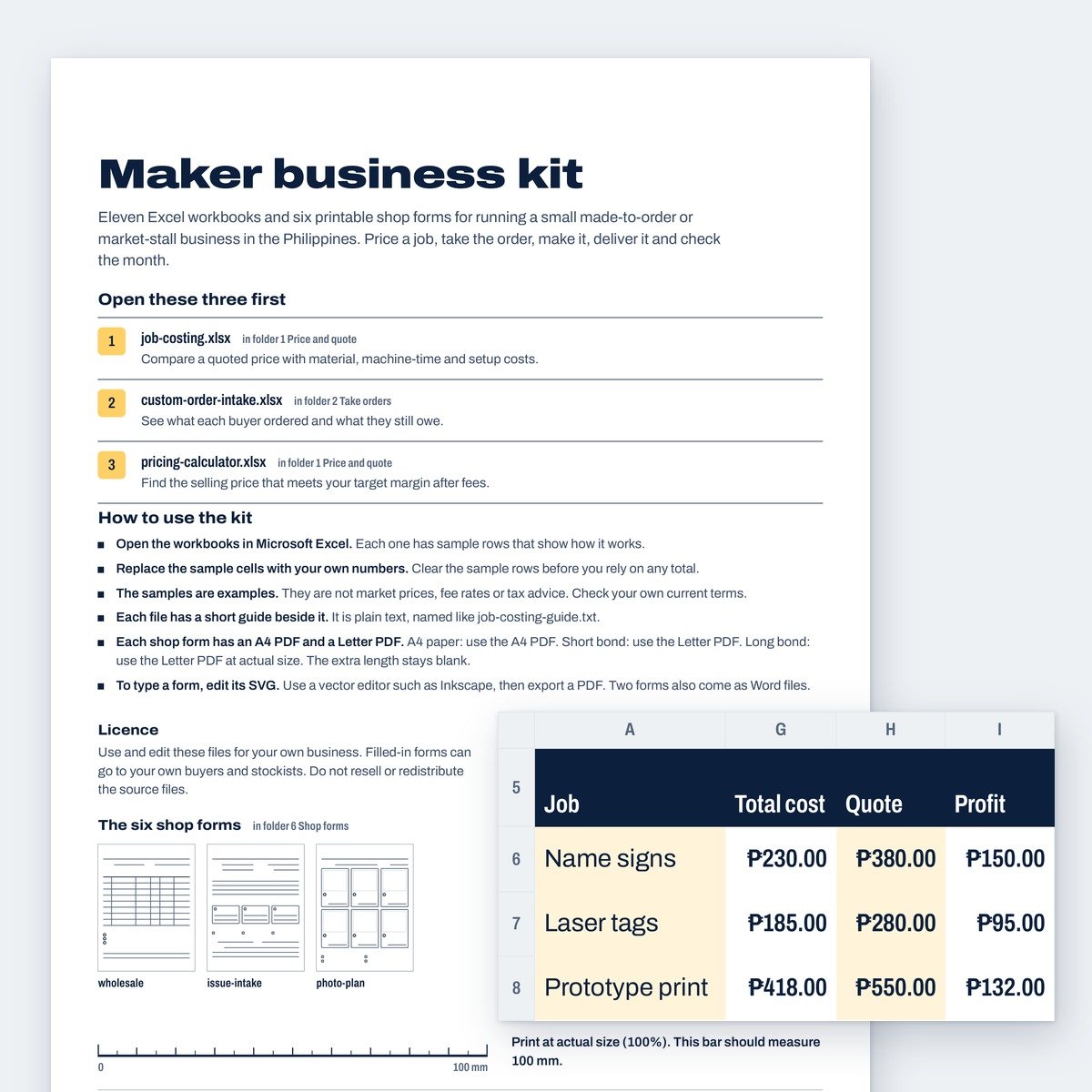
One ZIP file with 51 files: a Start here guide as an A4 PDF and a Letter PDF, a README, 11 Excel workbooks and 6 shop forms. Every workbook and form has its own short guide. Each form comes as an A4 PDF, a Letter PDF and an editable SVG, and two also as Word files.
What it helps with
Run a small made-to-order business from one folder. Price a job, take the order, restock, deliver and check the month’s profit. The 10 maker workbooks sell for ₱10 each and the pricing workbook for ₱99. This kit has all 11 plus 6 shop forms, in folders that follow the order of a job.
What is inside
1 Price and quote
- Pricing calculator (pricing-calculator.xlsx): find the selling price that meets your target margin after fees.
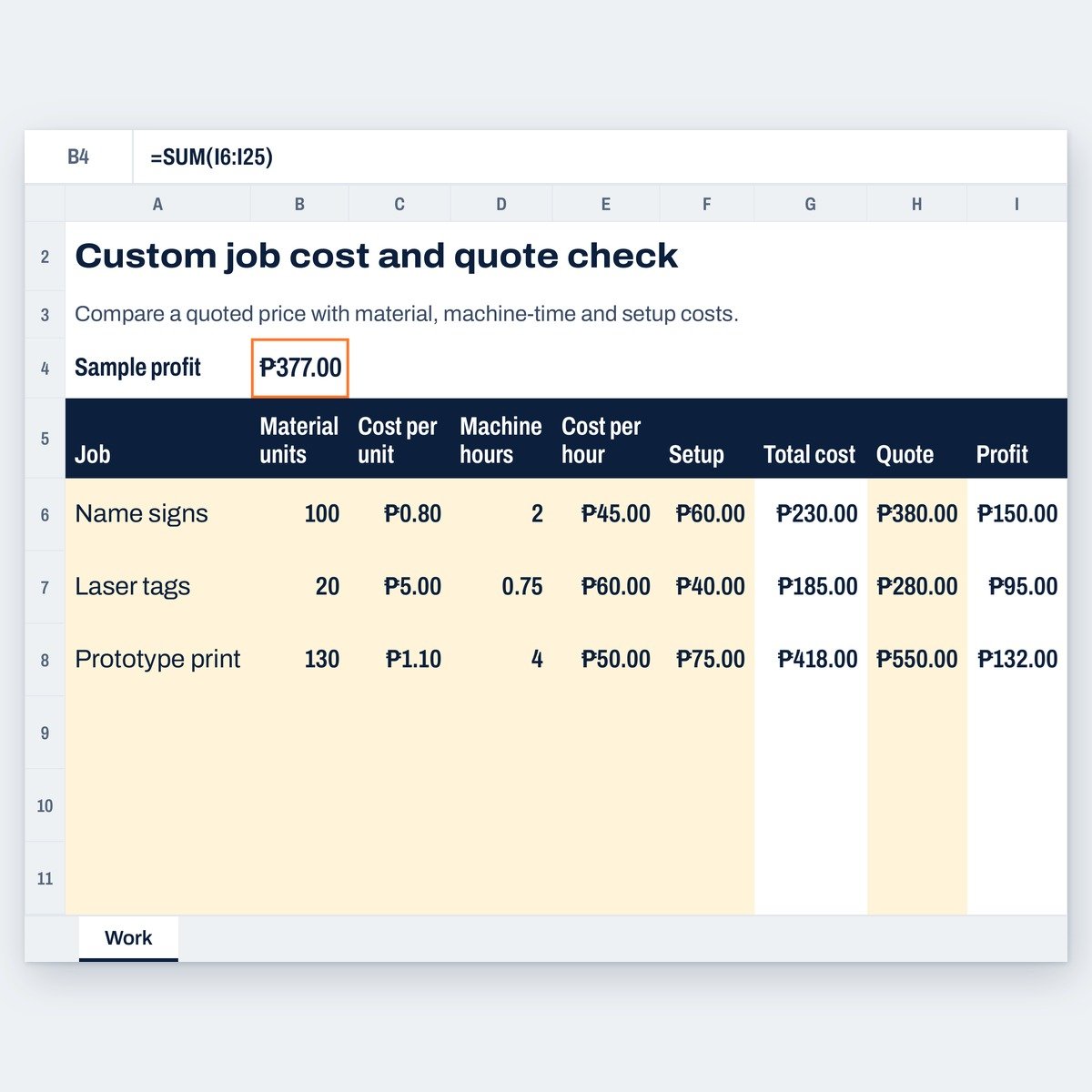
- Job cost and quote check (job-costing.xlsx): compare a quoted price with material, machine-time and setup costs.
- Sales channel fee check (channel-fee.xlsx): see your profit after the selling fees on each sales channel.
2 Take orders
- Custom order intake and balance tracker (custom-order-intake.xlsx): see what each buyer ordered and what they still owe.
- Event favor quantity planner (event-quantity.xlsx): turn a guest count and a spare allowance into pieces to make.
3 Make and restock
- Materials reorder planner (material-reorder.xlsx): buy only the material upcoming work needs, plus a safety reserve.
- 3D print batch yield sheet (batch-yield.xlsx): see the cost of each good piece after rejected prints.
4 Sell and deliver
- Pop-up event break-even planner (popup-break-even.xlsx): find the fewest pieces you must sell to cover an event.
- Payment reference check (gcash-reference.xlsx): spot short payments or mismatched references. It does not connect to GCash.
- Delivery dispatch cost log (dispatch-cost.xlsx): compare what you collect for delivery with what you pay, before dispatch.
5 Check the month
- Monthly scorecard (monthly-scorecard.xlsx): track net sales, profit and margin by month.
6 Shop forms
- Line sheet for trade buyers (wholesale PDF, SVG and Word files): send trade buyers your range and ordering terms on one page.
- Product issue intake (issue-intake PDF, SVG and Word files): record a buyer’s issue, the photos and the next action.
- Product photo shot plan (photo-plan PDF and SVG files): plan six honest product photos for a listing.
- Custom dimensions request (dimensions PDF and SVG files): capture a sketch and measurements for a made-to-fit item.
- Consignment handover (consignment PDF and SVG files): record the pieces handed to a stockist, checked by both sides.
- Workshop station sheet (workshop-card PDF and SVG files): write steps and a safety note for two craft stations on one page.
The forms carry no Stak Maker name, so you can hand them to your own buyers and stockists. The Start here guide lists every file and the job it does. Open the job cost, order intake and pricing workbooks first.
Who it is for
Makers and small sellers in the Philippines who take custom orders, sell at bazaars or sell online. Each workbook has sample rows that show how it works. Clear the samples before you rely on any total.
Need only one tool? Each maker workbook is also sold on its own in templates and tools.
Printing the forms
Each shop form comes as an A4 PDF and a Letter PDF with the same layout. Print at actual size (100%), not “Fit to page”. Print page 1 of Start here first and check that its bar measures 100 mm. Each form PDF has the same bar at its foot.
- A4 paper: print the A4 PDF.
- Short bond (8.5 x 11 in): print the Letter PDF.
- Long bond (8.5 x 13 in): print the Letter PDF at actual size. The extra length stays blank.
Everything sits at least 12 mm from the paper edge. To type a form instead, edit its SVG in a vector editor such as Inkscape, or the Word file where there is one, then export a PDF.
Before you buy
Digital download only. Nothing is shipped. Pay online with Maya, QR Ph or ShopeePay and the download link comes by email right away. The link does not expire. Paying by bank or GCash transfer? The link comes once we confirm your payment.
Open the workbooks in Microsoft Excel. Google Sheets import has not been checked.
Sample amounts and fee rates are examples, not market prices or tax advice. Use and edit the files for your own business. Filled-in forms can go to your own buyers and stockists. Do not resell or redistribute the source files. Questions? Message Stak Maker.
Are these the same workbooks sold one by one?
Yes. The 10 maker workbooks have the same sample rows and row formulas, with small fixes. The subtitle is no longer italic, the summary cell at the top shows pesos or pieces, and labels over peso amounts no longer repeat PHP. In the event favor quantity planner, the saved totals now match Excel’s own results. In the 3D print batch yield sheet and the sales channel fee check, the summary cell at the top is corrected. It now shows the average cost per good piece across all batches and the best channel’s profit. The pricing calculator is our ₱99 pricing workbook with a new file name and updated wording. The kit adds the 6 shop forms and the Start here guide.
Does the payment reference workbook connect to GCash?
No. You type in each reference and amount. It flags short payments and mismatched references.