NFC keychains: how they work and what to link
Updated October 14, 2026
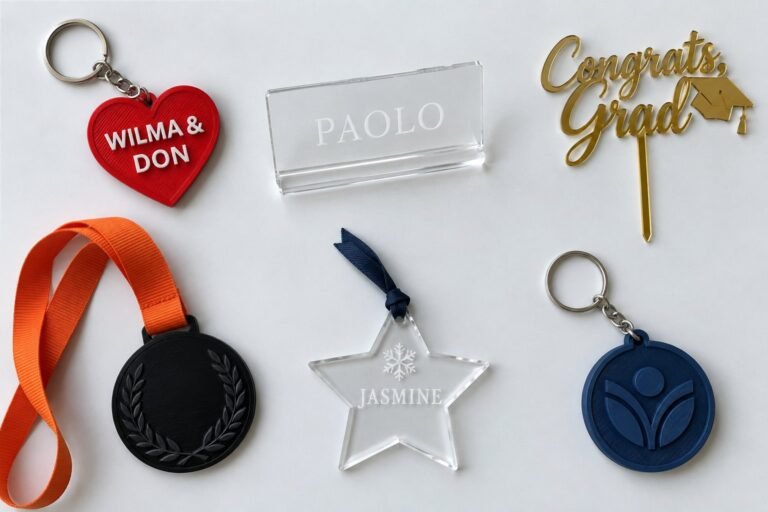
Keychains from the shop

The short answer
- An NFC keychain holds a small chip with a link on it. Tap it to a phone with NFC and the phone opens the link, with no app needed.
- iPhone XR, XS and newer read NFC tags without an app. Many Android phones do too, once NFC is switched on in Settings.
- Link anything with a web address: Instagram, TikTok, a portfolio, a contact card, a Google review page or your GCash QR.
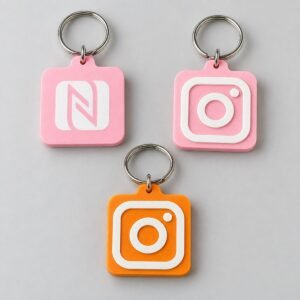
- The Stak Maker NFC keychain is ₱350, 3D printed with an Instagram logo or your own, and made in 2 to 4 business days.
What an NFC keychain is
NFC stands for near field communication. The keychain holds a small tag with your link stored on it. The tag has no battery: the phone powers it during the tap.
It only works up close, within a few centimeters. So the link opens only when someone chooses to tap.
How tapping works on iPhone and Android
iPhone
iPhone XR, XS and newer read NFC tags without an app. Unlock the phone and hold the top edge of its back to the keychain. A banner appears; tap it to open the link.
iPhone 7 to iPhone X can read tags too. Add NFC Tag Reader to Control Center, then open it before you tap.
Android
Not every Android phone has NFC, and some budget models leave it out. On phones that have it, NFC must be on. Open Settings, search for “NFC” and switch it on. On Samsung phones it sits under Connections; on Pixel phones, under Connected devices.
Unlock the phone and touch the keychain to the back, around the middle or near the camera. The antenna’s spot varies by model, so move slowly if nothing happens.
On any phone, thick or metal cases, card wallets and magnetic mounts can block the tap.
What people link
| Link | What it opens | Good for |
|---|---|---|
| Socials | Your Instagram, TikTok or Facebook profile | Creators, online sellers, networking |
| Portfolio | Your website or an online portfolio | Students, freelancers, job fairs |
| Contact card | A digital business card page or a contact card link | Business owners, sales teams, events |
| Reviews | Your shop’s Google review link | Cafes, salons and shops that want more reviews |
| Payments | An image of your GCash QR, so buyers can save it | Market stalls and pop-ups |
| Events | A photo album, RSVP form or event page | Debuts, weddings, reunions |
Test the link on a phone that isn’t signed in to your accounts. If it asks for a login there, it will ask everyone who taps.
Changing the link later
The product page says you can change the link anytime. To change it, message us with your order number and the new link, and we’ll tell you how.
A simple habit helps too: link a page you control, like your own website or a link-in-bio page. Then you can update what people see without touching the keychain.
NFC keychain or QR code?
| NFC keychain | QR code | |
|---|---|---|
| How it opens | Tap the phone to the keychain | Point the camera at the code |
| Phone needs | NFC, switched on | A camera |
| Distance | A few centimeters | Across a table, on a poster or a screen |
| Looks | A keychain with your logo, no pattern to print | A printed square pattern |
| Changing the link | Anytime, per the product page | Reprint it, unless it points to a page you can edit |
| Best for | Sharing in person, one tap at a time | Print, menus, slides and posters |
Many people use both: the keychain for meeting people, and the same link as a QR code for print.
For events and companies
NFC keychains work as tap-to-share business cards for a team, or as a giveaway that opens an event page or photo album. Team orders are welcome. Tell us whether every piece opens the same link or each person’s own.
For 30 or more, start at souvenirs and bulk orders. We quote the batch and send a mock-up first. Official receipts are issued under Stakmaker Online Shop.
Order an NFC keychain
The NFC smart keychain is ₱350. Choose the Instagram design, or “Custom link/design” with your own logo. Pick a color and paste your link.
It is 3D printed and made in 2 to 4 business days. We make it exactly as you type it. If something looks off, we’ll message you before production. More options are on custom keychains.
NFC keychain FAQ
Do NFC keychains work with iPhone?
Yes. iPhone XR, XS and newer read NFC tags without an app: unlock the phone, hold its top edge to the keychain and tap the banner. iPhone 7 to iPhone X need NFC Tag Reader, added from Control Center.
How do I turn on NFC on Android?
Open Settings, search for “NFC” and switch it on. On Samsung phones it is under Connections; on Pixel phones, under Connected devices. If Settings has no NFC option, that phone doesn’t have NFC.
Do NFC keychains need a battery or an app?
No. The tag has no battery; the phone powers it during the tap. Phones that read NFC open the link without a separate app.
Can I change the link on my NFC keychain?
Yes. The product page says you can change it anytime. Message us with your order number and the new link, and we’ll tell you how. Linking a page you can edit also lets you change what people see.
Is an NFC keychain better than a QR code?
It depends where you share. NFC is quicker face to face: one tap, no camera. A QR code works on any phone with a camera, and on print and screens. Many people use both with the same link.
How much is an NFC keychain in the Philippines?
At Stak Maker, the NFC smart keychain is ₱350, with an Instagram logo or your own logo. It is made in 2 to 4 business days. For 30 or more pieces, we quote the batch.
Is it safe to carry an NFC keychain?
The tag holds only the link you give us. Anyone who taps it can open that link, so link only what you would share in public.
Ordering for a team?

Not sure what to link? Message us