Manual payment reference reconciliation
₱10
Spot short payments or mismatched references without connecting to GCash. One editable Excel workbook and a short guide. Instant digital download after payment.
- Instant download
- Pay with Maya, QR Ph or ShopeePay
Need this adapted for your shop? Ask us about a custom file.
Details
What you get
One original .xlsx workbook and a README guide in a ZIP file. Sample entries show how it works; replace the amber cells with your own information.
What it helps with
Spot short payments or mismatched references without connecting to GCash.
What is inside
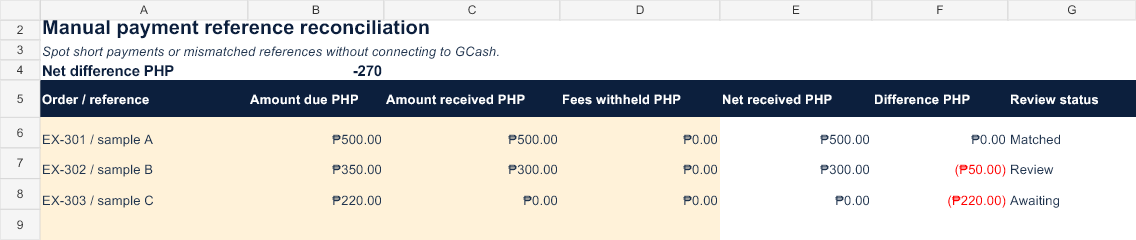
One sheet, one row per order. You type the order and reference, the amount due, the amount received and any fees withheld. The workbook shows what happened.
- Net received: amount received minus fees withheld.
- Difference: net received minus amount due. A negative number means a short payment.
- Review status: Awaiting if nothing was received, Matched if the difference is zero, and Review for anything else.
In the samples, a ₱500 order with ₱500 received shows Matched. A ₱350 order with ₱300 received shows a difference of minus 50 and Review. A ₱220 order with nothing received shows Awaiting. Rows 6 to 8 hold three sample payments. Rows 9 to 25 are blank, ready for your orders. Delete the samples before you start.
Who it is for
Small sellers who take payments by manual transfer and match them by hand at the end of the day. Copy each reference from a verified payment record yourself. The file does not read GCash and cannot confirm a payment. Check the sender, reference, amount and account before you mark an order paid. To track deposits and balances per order, pair it with the custom order intake tracker.
Before you buy
Digital download only; no physical product is shipped. Open the workbook in Microsoft Excel. Google Sheets import has not yet been verified. Sample rates and amounts are examples, not current market prices or tax advice. You may use and edit your copy for personal or business work; do not resell or redistribute the source workbook. Questions or a custom version? Message Stak Maker.
Does it connect to my GCash account?
No. It only compares numbers you type in. It never reads or sends anything to GCash.
Can I use it for other payment apps?
Yes. The columns are amounts and a reference, so it works for any manual payment you check by hand.