Custom order intake and balance tracker
₱10
See what each buyer ordered and what they still owe. One editable Excel workbook and a short guide. Instant digital download after payment.
- Instant download
- Pay with Maya, QR Ph or ShopeePay
Need this adapted for your shop? Ask us about a custom file.
Details
What you get
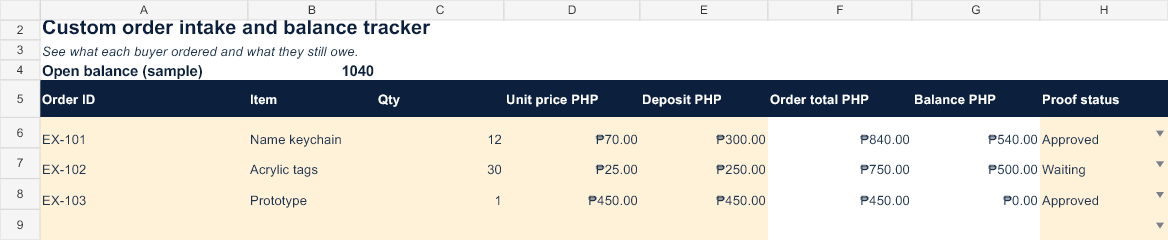
One original .xlsx workbook and a README guide in a ZIP file. Sample entries show how it works; replace the amber cells with your own information.
What it helps with
See what each buyer ordered and what they still owe.
What is inside
One sheet, one row per order. You enter the order ID, the item, the quantity, the agreed unit price and the deposit. The workbook works out:
- Order total: quantity times unit price.
- Balance: order total minus deposit, never below zero.
A proof status column has a drop-down with three choices: Waiting, Approved and Changes needed. It is your own note and does not notify a buyer. The top cell adds up all open balances. In the samples, 12 name keychains at ₱70 with a ₱300 deposit leave a balance of ₱540. Rows 6 to 8 hold three sample orders. Rows 9 to 25 are ready for new orders. Clear the samples before you rely on the balance.
Who it is for
Makers who take custom orders by message and need one list of deposits, balances and proof approvals. Balance leaves out delivery and other charges unless you include them in the unit price.
Want to see our own proof step? Read how personalizing a gift works.
Before you buy
Digital download only; no physical product is shipped. Open the workbook in Microsoft Excel. Google Sheets import has not yet been verified. Sample rates and amounts are examples, not current market prices or tax advice. You may use and edit your copy for personal or business work; do not resell or redistribute the source workbook. Questions or a custom version? Message Stak Maker.
Does it send reminders or proofs to buyers?
No. The proof status is a note for you. Send proofs and reminders yourself.
Can I track partial payments?
Enter the total amount paid so far in the deposit column. The balance updates.